Moonshot put out the Kimi K3 weights at the end of July: 2.8 trillion parameters in a mixture-of-experts layout (16 of 896 experts active per token, about 104B active), a 1M-token native context window, and tool calling that holds up in agent loops. It benchmarks like a closed frontier model. At launch, K3 ranked #1 on Frontend Code Arena, above Claude Fable 5, and Moonshot reports 88.3 on Terminal-Bench 2.1, just behind GPT-5.6 Sol at 88.8 (measured on different agent harnesses). No open-weight model has scored in that range before. (Featherless supports Kimi K3 at 256K context on the serverless Developer plan, and 1M on a dedicated instance)
The weights are about 1.56TB in MXFP4, and Moonshot’s deployment guidance suggests a supernode with 64 or more accelerators. Nobody is running this on a gaming PC. If you want K3 in your coding tools, you point them at an API someone else runs.
Kimi K3 has been live on Featherless since July 29: model ID moonshotai/Kimi-K3, on the same OpenAI-compatible API as the other 40,000+ open models we host, with no logging of prompts or completions. When K2 came out, the first thing most people did was wire it into a coding agent, so this guide does that for K3, tool by tool: opencode, Claude Code, Cline, Roo Code, Aider, and whatever you’ve built yourself. Costs come at the end, because running K3 in an agent all day is a different problem from trying it once.
What you need before you start
Three values, same for every tool below:
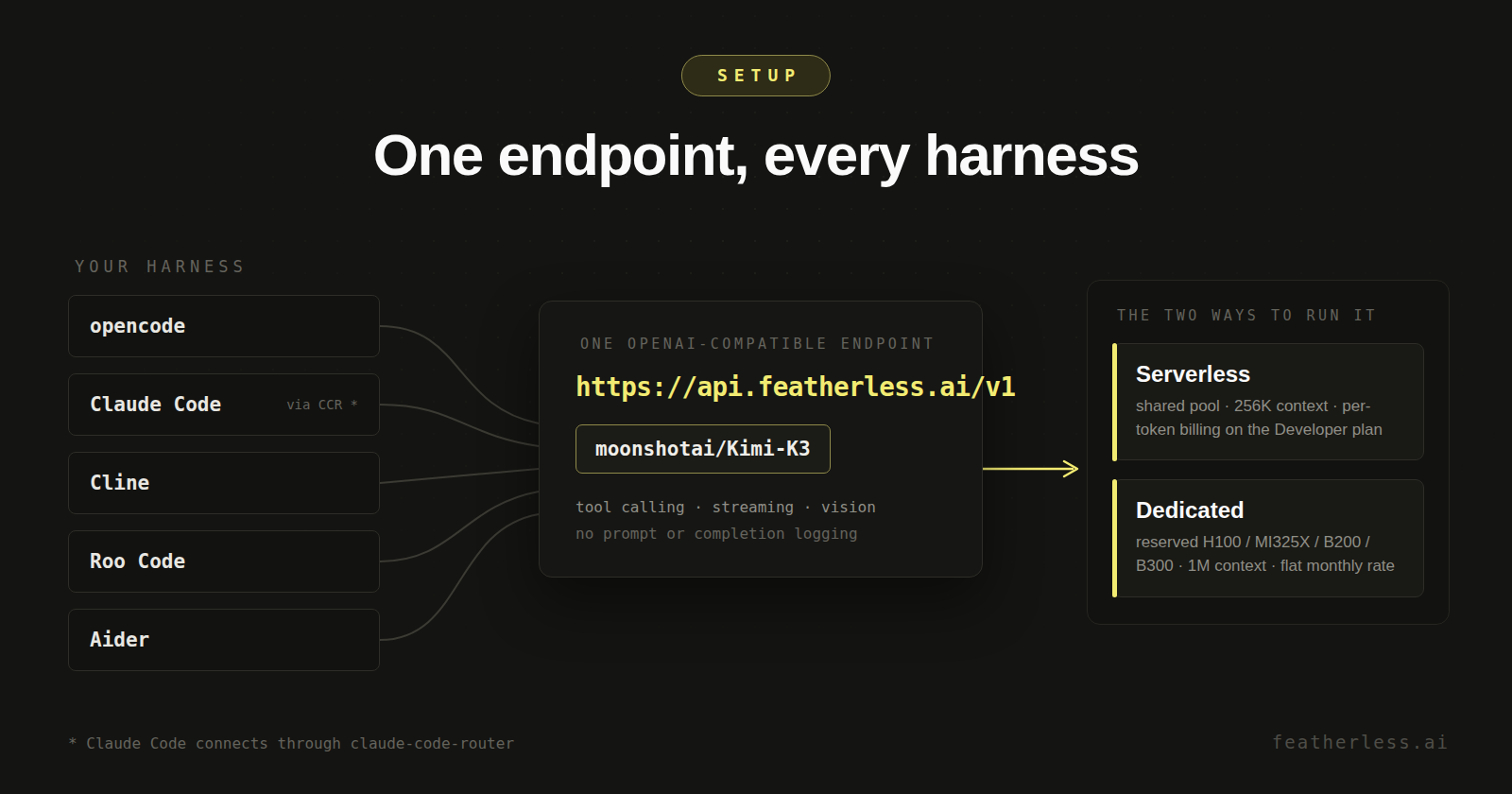
- Base URL: https://api.featherless.ai/v1
- API key: from your Featherless dashboard (create an account here)
- Model ID: moonshotai/Kimi-K3
For API and agent traffic you want the Developer plan: usage-based billing, unused credits roll over, and the fastest response times. The Chat plan is for human-driven use only and excludes automation, so don’t try to run an agent fleet on it.
Featherless serves K3 with a 256K context window on the serverless Developer plan, and the full 1M on dedicated. If your workload needs six-figure context, skip ahead to the dedicated section.
Kimi K3 in OpenCode
opencode takes custom providers through a JSON config. Drop this in opencode.json at your project root (or ~/.config/opencode/opencode.json for global use):
{
  "$schema": "https://opencode.ai/config.json",
  "provider": {
    "featherless": {
      "npm": "@ai-sdk/openai-compatible",
      "name": "Featherless",
      "options": {
        "baseURL": "https://api.featherless.ai/v1",
        "apiKey": "{env:FEATHERLESS_API_KEY}"
      },
      "models": {
        "moonshotai/Kimi-K3": {
          "name": "Kimi K3",
          "limit": { "context": 262144, "output": 262144 }
        }
      }
    }
  }
}
Export FEATHERLESS_API_KEY, launch opencode, and pick Kimi K3 from /models. The limit block tells opencode when to compact the session, which keeps long runs from silently truncating; bump it as we expand K3’s served context.
Kimi K3 in Claude Code
Claude Code expects an Anthropic-format endpoint, so route it through claude-code-router (CCR), which translates to Featherless's OpenAI-compatible API in both directions, including tool calls and the reasoning stream.
Install it:
npm install -g @musistudio/claude-code-router
Then open the config UI:
ccr ui
In the UI, go to Providers → Add Provider and add a custom OpenAI-compatible endpoint:
- Protocol: OpenAI Chat Completions
- Endpoint: https://api.featherless.ai/v1/chat/completions
- API key: your Featherless key
- Model: moonshotai/Kimi-K3
Save and check the connection, then create and enable a Claude Code profile that uses that model. Launch Claude Code through it:
ccr "<your-profile-name>"
Everything else — slash commands, hooks, MCP servers — works as normal.
Kimi K3 in Cline and Roo Code
Both use the same provider type, and we’ve kept a guide for this pattern since the days when a 32B coder model was the exciting option. In the extension settings:
- API Provider: OpenAI Compatible
- Base URL: https://api.featherless.ai/v1
- API Key: your Featherless key
- Model ID: moonshotai/Kimi-K3
In the model configuration section, set the context window to 262144 so the extension plans its own compaction correctly. Roo Code uses native tool calling exclusively (no XML fallback), which works here: K3’s tool calling is served natively on Featherless. Image support can stay on; K3 is multimodal with its MoonViT-V2 encoder.
Kimi K3 in Aider
Aider needs two environment variables and a flag:
export OPENAI_API_BASE=https://api.featherless.ai/v1
export OPENAI_API_KEY=your-featherless-key
aider --model openai/moonshotai/Kimi-K3
Aider will warn that it doesn’t recognize the model. Silence the warning, and give it the right compaction math, with a .aider.model.metadata.json in your project:
{
  "openai/moonshotai/Kimi-K3": {
    "max_input_tokens": 262144,
    "max_output_tokens": 262144
  }
}
Any other coding agent
Pi, Zed, Continue, a homegrown loop: anything that speaks the OpenAI API takes the same three values, base URL, key, and model ID. Test with curl before you touch any config files:
curl https://api.featherless.ai/v1/chat/completions \
  -H "Authorization: Bearer $FEATHERLESS_API_KEY" \
  -H "Content-Type: application/json" \
  -d '{
    "model": "moonshotai/Kimi-K3",
    "messages": [{"role": "user", "content": "Write a bash one-liner
      that finds TODOs older than 30 days by git blame."}]
  }'
If that returns a completion, your endpoint, key, and model ID are working. One K3-specific caveat for anything homegrown: for multi-turn and tool use you have to pass the full assistant message back, including reasoning_content and tool_calls, or the model loses its place. The tools above handle this automatically. Tool calling, streaming, and vision all ride the standard OpenAI-compatible fields.
The tokenomics of running K3 as an agent
Now, costs. K3 reasons on every request, with adjustable low, high, or max reasoning effort. Within days of launch, Hacker News threads filled with developers who had burned through a month of Moonshot subscription in three days, which Moonshot’s list pricing ($3.00 per million input tokens, $15.00 per million output) goes some way to explaining. We wrote about this dynamic in Tokenomics 101: the number to watch is cost per successful task, and reasoning models inside agent harnesses push it hard.
The launch window added a second problem: shared capacity. When a model this hot drops, every pooled endpoint gets slammed at once, and the same HN threads complaining about cost also complained about speed. Benchmarks measure the model; latency measures whoever is serving it.
For one developer doing scoped work, serverless on the Developer plan is the right call. You pay for what you use, credits roll over, and the setup above takes five minutes.
The math changes once the agents run all day. A team of coding agents through the workday, or CI agents around the clock, is the workload where per-token pricing scales against you and reserved hardware wins. That’s what Featherless dedicated GPUs are: your own reserved capacity (H100, B200, B300, or AMD MI325X) at a flat monthly rate, provisioned for your workload instead of pooled with the launch-day rush. Context length, concurrency, and throughput are set by the hardware you reserve, not by shared-tier limits. Traffic stays inside VPC isolation and nothing is logged. And capacity is benchmarked before you sign: we run your workload on the hardware, you see the tokens per second, then you decide.
We’ve published what this looks like in practice: a dedicated GLM 5.2 deployment on four MI325X GPUs serving an agent workload that would have cost about $150K/month in Opus API bills for $7,592 a month, flat. K3 is a bigger model with different hardware math, but the direction is the same. Sustained agent traffic on reserved GPUs costs a fraction of metered pricing, and the latency holds when the public pools get busy.
If your per-token bill is growing faster than your team, talk to us about a dedicated K3 deployment.
Kimi K3 FAQ
Is Kimi K3 open source? Open-weight. The weights are on Hugging Face under the Kimi K3 License, which permits commercial use with conditions. The training data and recipe are not public.
Can I run Kimi K3 locally? Realistically, no. The MXFP4 weights alone are ~1.56TB before KV cache and runtime overhead, and Moonshot recommends 64+ accelerators. This is a model you rent, whether serverless or on dedicated GPUs.
What is Kimi K3’s context window? 1M tokens natively. Served context depends on the provider: Featherless serves 256K on the serverless Developer plan, and the full 1M on a dedicated deployment.
What does Kimi K3 cost? On Featherless serverless, K3 is $2/M input, $0.30/M cached, and $10/M output on the Developer plan, cheaper than Moonshot’s own $3/$15. On dedicated, a flat monthly rate per GPU — contact us for sizing.
Is Kimi K3 better than Claude for coding? On some public benchmarks at launch, yes: #1 on Frontend Code Arena, and 88.3 on Terminal-Bench 2.1 (Moonshot’s figure, on a different harness than Sol’s). In practice, developers report it trades wins with Fable 5 and Opus 4.8 depending on the task, and that it spends more tokens getting there. The way to settle it is to run both on your own repo for a week.
Moonshot built an open-weight model that competes at the frontier, then published 1.56 terabytes of weights that almost nobody can serve themselves. We can. Point your tools at moonshotai/Kimi-K3 on the Developer plan, and when your agents outgrow serverless, talk to us about dedicated.
Related articles
Start building under 3 minutes